Live Streaming Software is revolutionizing the way we connect and engage with audiences across the globe. Imagine broadcasting your events in real-time, capturing the attention of viewers with stunning video quality and interactive features. With the right live streaming software, you can transform any presentation into an engaging experience that captivates your audience and fosters community.
Whether you’re a content creator, a business professional, or an educator, understanding the essential features of live streaming software is crucial. From user-friendly interfaces to robust security measures, these tools not only enhance the streaming experience but also facilitate seamless collaboration and increased audience engagement. Discover how top platforms stand out by integrating essential elements that cater to diverse streaming needs.
Understanding Essential Features of Live Streaming Software
In the fast-evolving world of live streaming, selecting the right software can significantly influence your broadcasting success. Understanding the fundamental features is crucial for making an informed choice that aligns with your needs. Three essential features stand out in live streaming software: adaptability for various platforms, interactive tools for audience engagement, and reliable streaming quality. These features contribute to a seamless and enjoyable streaming experience.
Key Features of Live Streaming Software
- Multi-Platform Support: The ability to broadcast across various platforms like YouTube, Facebook, and Twitch is vital. This adaptability not only broadens your audience reach but also enhances viewer engagement by meeting them where they are.
- Interactive Tools: Features such as live polls, Q&A sessions, and chat functionalities allow real-time interaction between the host and the audience. This interaction enhances viewer involvement and creates a more immersive experience.
- High-Quality Streaming: The software should provide options for HD streaming and stable connections. Reliable video quality prevents viewer drop-off and ensures that your content is presented in the best light possible.
Examples of popular software that effectively incorporate these features include OBS Studio, which is known for its multi-platform capabilities, and StreamYard, which excels in interactive tools for audience engagement.
The Importance of User Interface Design in Live Streaming Software
User interface design plays a pivotal role in the efficiency of live streaming software. A user-friendly interface can significantly enhance the overall streaming experience for both the broadcaster and the audience.
Further details about Gardening Tools is accessible to provide you additional insights.
Impact of User-Friendly Interfaces
In live streaming, efficiency and audience engagement are closely tied to the interface design. A well-structured layout minimizes confusion and allows users to navigate through the software with ease. Design elements that enhance usability include:
- Intuitive Navigation: Clear menus and easily accessible features facilitate quick adjustments during a live broadcast.
- Responsive Design: Ensures that the software works seamlessly across different devices, from desktops to mobile phones.
- Customization Options: Allow users to tailor their interface according to personal preferences, enhancing comfort and productivity.
When comparing live streaming software like Zoom and OBS Studio, it’s clear that while Zoom offers a straightforward interface for meetings, OBS Studio provides a more complex but highly customizable environment suited for advanced users.
Assessing Live Streaming Software for Remote Collaboration
Live streaming software is essential for enhancing remote collaboration among teams. With features that facilitate real-time communication, these tools are redefining how organizations conduct meetings and presentations.
Facilitating Real-Time Collaboration, Live Streaming Software
Live streaming software provides a platform for teams to connect instantly, regardless of geographical barriers. This capability is particularly beneficial in industries such as education, marketing, and tech, where teams often need to collaborate on presentations or strategy sessions.Examples of industries utilizing live streaming include:
- Education: Schools and universities use live streaming for lectures and remote learning.
- Corporate: Companies rely on live streams for team meetings, training sessions, and product launches.
- Events: Trade shows and conferences leverage live streaming to reach broader audiences.
While these tools enhance collaboration, challenges such as technical difficulties and disengaged participants can arise. Organizations can overcome these issues by providing training on software use and ensuring robust internet connections.
Evaluating Audience Engagement through Live Streaming Software
Engaging an audience during online events is a critical aspect of successful live streaming. Various strategies can be employed to maximize interaction and keep viewers interested.
Obtain recommendations related to Online Video Editor that can assist you today.
Maximizing Audience Interaction
To create an engaging experience, live streamers can use various tools and techniques:
- Live Polls: These encourage audience participation and provide instant feedback.
- Q&A Sessions: Allow viewers to ask questions in real-time, fostering a sense of involvement.
- Interactive Chat: Engaging with viewers in the chat can create a community feeling and encourage more participation.
A notable case study is the annual TED conference, where live streaming has been effectively used to increase audience interaction and boost global engagement.
The Significance of Video Quality and Streaming Stability
Video quality and streaming stability are paramount in selecting live streaming software. These factors directly influence the viewer’s experience and satisfaction.
Impact of Video Resolution and Bit Rate
The resolution and bit rate of the stream can significantly affect how content is perceived by the audience. Higher video quality leads to better viewer retention and satisfaction. Technical requirements for high-quality streaming include:
- High-Speed Internet: A stable internet connection is essential for preventing buffering and interruptions.
- Appropriate Hardware: A powerful computer and quality camera setup can enhance video quality.
- Software Optimization: Ensuring the software is correctly configured to handle high-definition streaming is crucial.
Comparing popular software like Zoom and Vimeo shows that Vimeo offers superior video quality with higher resolution options, while Zoom prioritizes ease of use and accessibility.
Find out about how buat produk untuk shop nearme can deliver the best answers for your issues.
Integration Capabilities with Social Media Platforms
The ability to integrate live streaming software with social media platforms enhances audience reach and engagement. This integration allows for a broader broadcasting scope and greater viewer interaction.
Linking to Social Media Channels
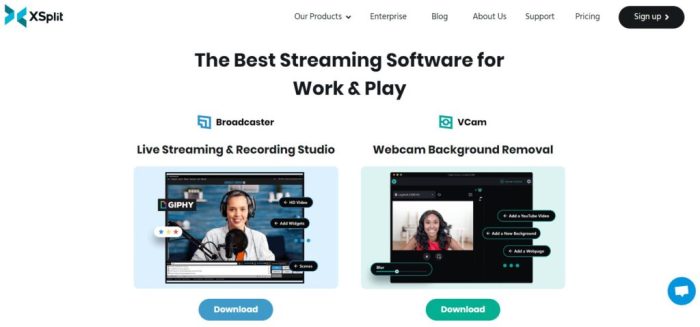
Many live streaming software options allow seamless connections with platforms like Facebook, Instagram, and YouTube. This capability expands your audience and increases visibility.Popular software known for effective social media integration includes:
- StreamYard: Offers straightforward streaming to multiple social platforms simultaneously.
- Restream: Specializes in broadcasting to numerous channels at once, maximizing audience reach.
While this multi-platform approach can amplify reach, it also comes with challenges such as managing multiple chats and ensuring a consistent message across platforms.
Analyzing Pricing Models of Live Streaming Software
The pricing model of live streaming software can significantly influence user choice. Understanding different structures can aid in selecting the right software for your budget.
Common Pricing Structures
Live streaming software typically offers a range of pricing models:
- Subscription Models: Monthly or yearly payments for ongoing use and updates.
- One-Time Fees: A single payment for perpetual use of the software.
- Freemium Options: Basic features are free, with advanced features available through paid upgrades.
Budget constraints often dictate user choices, with smaller organizations leaning toward more affordable options. A comparison of software like OBS Studio (free) and Wirecast (paid) illustrates the cost-effectiveness of different models.
Identifying Key Security Features in Live Streaming Software
With the increasing reliance on technology, security features are essential in live streaming software to protect user data and privacy.
Addressing Security Risks
Live streaming carries inherent security risks, including unauthorized access and data breaches. Software can mitigate these threats with robust security measures.Key security features to consider include:
- Encryption: Protects data transmitted during live streams.
- Access Controls: Limit who can join or view live streams, ensuring only authorized participants can access content.
- Regular Updates: Keeping software up to date can prevent vulnerabilities from being exploited.
Real-life incidents, such as unauthorized access during high-profile live events, highlight the crucial role of security features in protecting sensitive information and maintaining user trust.
Last Point
In summary, the right Live Streaming Software can significantly enhance your online presence and audience interaction. By prioritizing features like video quality, user interface, and integration capabilities, you can ensure a successful streaming experience that resonates with your viewers. As we embrace this dynamic way of connecting, investing in quality software will be your key to unlocking a world of possibilities.